Tuesday, January 12, 2021

User Data Deletion

 User Data Deletion

There will be no user data retained. Therefore no need of requesting to delete your data

Thursday, November 26, 2020

Receiving values from a AWS Glue Job

 Recently I wanted to use AWS Glue heavily for some development work at office. AWS Glue is a managed service from AWS which comes handy in processing or computing large amounts of data. My use case was to implement an ETL (Extract - Transform - Load) work flow. Therefore there were multiple glue jobs doing different tasks varied form decompression, data processing, validating, loading, etc. Those glue jobs were managed by a single AWS Step Function in each workflows. Everything was straightforward until there was a requirement to read some values from AWS Glue Job and include them in a SNS Notification. As everybody does, I called Google for my help. I started going through documentations and stackoverflow posts. Then finally it broke my heart when I read this post.


It was evident that AWS Glue Jobs are designed not to return values.

"By definition, AWS glue is expected to work on huge amount of data and hence it is expected that output will also be huge amount of data."

So the expectation was to store the data at the end of the processing. But my use case was to read some small set of value. Following are the approaches I figured out.

1. Saving the values to a file using a Lambda function and use it when required

You can create a lambda function that would accept the values you want to store and it can either write it to a file and store it in a s3 or can put the value into a DB for future reference. Then that lambda function can be invoked within the Glue Job and pass the required values.


Lambda function

import json
import boto3

def lambda_handler(event, context):
s3_client = boto3.client('s3')
bucket_name = 'myBucket'
s3_path = 'path/to/dir/values.txt'

values_str = json.dumps(event)
print("Received values: %s" % values_str)

try:
response = s3_client.get_object(Bucket=bucket_name, Key=s3_path)
current_content = response['Body'].read().decode('utf-8')
print("Reading content from file at s3:%s key:%s" % (bucket_name, s3_path))
content = '{}, {}'.format(current_content, values_str)
except s3_client.exceptions.NoSuchKey:
print("Created a new file at s3:%s key:%s" % (bucket_name, s3_path))
content = values_str

encoded_string = content.encode("utf-8")

response = s3_client.put_object(Bucket=bucket_name, Key=s3_path, Body=encoded_string)
return {
'statusCode': 200,
'body': json.dumps(response)
}

Lambda invocation


import boto3
import json

# GLUE JOB CODE

lambda_client = boto3.client('lambda')

response = lambda_client.invoke(FunctionName='myLambdaFnName', Payload=json.dumps({
"key1": 'val',
"key2": a_value_from_glue
}))


2. Logging the values with a special pattern and reading it from CloudWatch

You can easily log your values. When you log make sure to include a special pattern so that you can easily extract those values. Any other service can fetch those log entries using the CloudWatch API. Refer the following example

Logging within the the Glue Job

# GLUE JOB CODE

print("[MY_SERVICE] key1: val1")
print("[MY_SERVICE] key2: %s" % a_value_from_glue)

Reading the values

import boto3

logs_client = boto3.client('logs')
repsonse = logs_client.start_query(
logGroupName='/aws-glue/jobs/output',
startTime=timestamp,
endTime=int(datetime.now().timestamp()),
queryString='fields @timestamp, @message | filter @message like /MY_SERVICE/'
)

query_id = repsonse['queryId']

query_response = None
while query_response == None or query_response['status'] == 'Running':
time.sleep(1)
query_response = logs_client.get_query_results(
queryId=query_id
)

logger.info('Received results: {}'.format(query_response['results']))

results = []
for result in query_response['results']:
timestamp = next(ele for ele in result if ele['field']=='@timestamp')['value']
message = next(ele for ele in result if ele['field']=='@message')['value'].replace('\n', '')
results.append('{}: {}'.format(timestamp, message))

print(results)


Please note that there can be a small delay when logs are pushed to CloudWatch, therefore make sure to give enough time for the logs to get pushed.

Happy coding folks!


Thursday, April 23, 2020

Thou shall pay thy taxes

Hi, recently(writing on 24th April 2020) government introduced some new tax schema called Advanced Personal Income Tax (APIT). Don't ask me what it is, I also have no idea.
But one thing I know is we have to pay that.
Paying taxes is not a bad thing, country needs money too, not just you.

Image soure
So I'm sharing my journey of becoming a good tax payer of Sri Lanka. Hope this would help you too.
Following are the steps I followed, I also have a lot of questions in my mind. Let's see what we can figure out.

The first step would be to create an account. You may already have given consent to your employee to pay PAYEE and APIT taxes on behalf of you, but still you need an account.
Annually you can submit a tax return and if you are lucky you can get a refund 🤗

Create a new account if you don't have one


  • Go to this link.
  • Then from that drop of Registration type select INDIVIDUAL LOCAL
  • You'll get a huge form to fill. Fill it carefully.
  • You will be requested to upload an image of your NIC
  • For the field of Purpose of registration what I select was TAX PURPOSE
  • Once you submit you will be navigated to the the confirmation page
  • Check all the details again.
  • Fill the declaration and submit.

They say they will mail a notification within 5 days( previously I selected email as my preferred communication medium, save paper -> save trees 🌲 )

That's it for now folks. Happy paying taxes :)

PS: I am making this a living document, I will update more info when I receive the confirmation and other data.I am not a financial person, so everything will be on laymen's terms and this is an alien subject for me, therefore please correct me if something is wrong

Wednesday, February 19, 2020

How to delete a conflicting document in CouchDB 1.6.1

Retrieve the list of conflicting revisions

User the following curl to retrieve the list of conflicting revisions

curl -u userName:password http://<IP>:5984/<DB_NAME>/<DOC_NAME>\?conflicts\=true

The output would be something like following

{"_id":"my_doc","_rev":"10007-41ad08f6c152a9da8458bc5b1a7d86a7", "documentObject":{"index":{...........}),"_conflicts":["10003-d109ea0ea25918a83bbde4de6753f173","10001-1b618568334a43b2f61fc2f710efaac8","9992-
..........
6433482dd8f753c41d67949c1d11b296","563-5cc0de9756e78a004b68c054260c60a8","277-0e5c2632c940a6973b21ff0ef7c32f6a"]}

Then copy the conflicting revisions to an array to and enter it to the terminal

array="10003-d109ea0ea25918a83bbde4de6753f173","10001-1b618568334a43b2f61fc2f710efaac8","9992-
..........
6433482dd8f753c41d67949c1d11b296","563-5cc0de9756e78a004b68c054260c60a8","277-0e5c2632c940a6973b21ff0ef7c32f6a"

Delete the corresponding revisions

Write the script to execute the delete call

for i in $(echo $array | sed "s/,/ /g")
do
    curl -u userName:password -X DELETE http://<IP>:<DB_NAME>/<DOC_NAME>\?rev\=$i
done

You will see output like follows

{"ok":true,"id":"settings","rev":"10004-73a7da6d7551759cbecbd4a14bfbe213"}
{"ok":true,"id":"settings","rev":"10002-df955439c468e65aab946be7db63be80"}
{"ok":true,"id":"settings","rev":"9993-8966c9010602c8a053cb734792ff0f00"}
{"ok":true,"id":"settings","rev":"9992-5c8032bc4d2798fbade3324335f1f393"}

{"ok":true,"id":"settings","rev":"9973-d5b8a7a15fbe3197e09e71b42c82d14f"}
.....

Sunday, December 29, 2019

Free up disk space on Mac

Have you ever run out to disk space in your mac? You might need to figure out which files and folders eat most of your disc space.

Option 1: Finding the largest Files
One option is to open the Finder and search the files using 'This Mac' and sort the files by size.


Option 2: Finding the largest Folders
Open the terminal and go to your user folder by typing 'cd ~/' then enter the following command. It will list the largest folders in the sorting order. It may take a while to list. Don't worry about the warning messages.

du -a * | sort -r -n | head -10

Then you can proceed to delete the unnecessary folders

One of the culprits of eating disk space is the XCode app and its related files


Friday, December 27, 2019

Software Security Summary


Image result for software security

the goal of software security is to maintain the confidentiality, integrity, and availability of information resources in order to enable successful business operations. This goal is accomplished through the implementation of security controls.

Risk is a combination of factors that threaten the success of the business. This can be described conceptually as follows: a threat agent interacts with a system, which may have a vulnerability that can be exploited in order to cause an impact.

Eg: a car burglar (threat agent) goes through a parking lot checking cars (the system) for unlocked doors (the vulnerability) and when they find one, they open the door (the exploit) and take whatever is inside (the impact).

A dev team: Approaches the system based on the intended functionalities
An attacker: What operations can be done on the system(nothing avoided is possible)

security holes can be introduced in

  1. Requirement gaps
  2. System logic error
  3. Poor coding practices
  4. Improper deployments
  5. Security holes introduced during maintenance and updating phases
Reference: https://www.owasp.org/images/0/08/OWASP_SCP_Quick_Reference_Guide_v2.pdf


Thursday, December 12, 2019

Threads Vs Processes


You might come across situations where you need to decide whether to use a thread or a process to achieve a certain task. Here I am sharing my experience on selecting what's best depending on your requirements

First, let's what is a process?
  • A process is an executing instance of an application/program
  • Process control block holds information about the process.
  • Process priority, process id, process state, CPU register, program counter, stack pointer, the status of opened files, scheduling algorithms, etc. 
  • A process can create other processes which are known as Child Processes.
  • The process takes more time to terminate and it is isolated means it does not share the memory with any other process.

Then what is a thread?
  • A thread is a path of execution within a process. 
  • A process can contain multiple threads
  • A thread takes less time to terminate as compared to a process
Let's see how does a process work
  • Process creation using fork system call
    • fork() creates a replica of the parent process 
    • Page Table and Kernal Stack are duplicated, new PCB is created
    • Child process state is set to NEW -> READY
    • Process is moved to the ready queue of the Kernal
    • Copy On Write (COW) is used by the child process
  • The first process of Unix system is known as the Super parent.
    • Location: /sbin/init
    • Created by the kernel during boot
    • Typically starts several scripts present in /etc/init.d
  • Process termination
    • Voluntary termination: exit(0)
    • Involuntary termination: kill(pid, signal) 
    • Pid: process Id
    • Signal: asynchronous message send by the OS/another process (eg: SIGTERM, SIGQUIT)
  • Process communication(IPC)
    • Shared memory: shmget, shmat, shmdt 
    • Message passing:
    • Shared memory is created in kernel
    • Slow
    • Pipes
    • Signals
How does a thread work?
  • Threads are very inexpensive to create and destroy, and they are inexpensive to represent
  • When a new thread is created it shares its code section, data section and operating system resources like open files with other threads.
  • But it allocates its own stack, register set and a program counter.
  • With so little context, it is much faster to switch between threads
  • Creating a thread, switching between threads and synchronization between threads can all be done without the intervention of the kernel

Processes are good when you have a task, where the task

  • Has sufficient work to do for a long period of time continuously
  • Does not require much communication between tasks
  • Has less context switching
  • Can independently work from other tasks
  • Does not require to be controlled

Threads are good when you have a task, where the task

  • Has less heavy work to do
  • Has a small life span
  • Requires communication between other tasks
  • Requires context switching
  • Depends on other tasks
  • Requires synchronization
  • Depends on shared data/resources
  • Requires control and coordination

You may consider the following factors when selecting between threads and processes

  • Type of work (IO-bound, computation, etc.)
  • Lifetime (Short vs Long)
  • Scheduling
  • Resource Sharing
  • Data Sharing
  • Communication
  • Thread/Process security and safety
  • Control and Synchronization
  • Environment and technology stack

Tuesday, November 11, 2014

Coding Good Practices : Constants

We'll discuss a good practice in coding which is using Constants.

A constant in Java is used to map an exact and unchanging value to a unique variable name.

Those constants make the code a bit more robust and more human readable. As those constant values can be used in multiple places, it gives you a single point to change the value of the constant if requires.

(public/private) static final TYPE NAME = VALUE;

Where TYPE is the type, NAME is the name in all caps with underscores for spaces, and VALUE is the constant value;
Lets see an example

public final class Consts  {
      public static final int SECONDS_IN_HOUR = 60 * 60 // sure, this will never change, but it will make the code where you use it a lot more readable
      public static final String DEFAULT_USERNAME = "Fernando" // this can be used in several places
      public static final double AVOGADROS_NUMBER   = 6.02214199e23;

      private Consts  () {
      // a private constructor prevents from instantiating the class
      }
}

The static Keyword
The static keyword makes that variable to the class instead of a specific instance (Object).

The final Keyword
When we declare a variable to be final we are telling Java that we will NOT allow the variable’s “pointer” to the value to be changed. In other words the final keyword means that once the value has been assigned, it cannot be re-assigned. So if we tried to put in some code later that tries to change a a final variable we would get a compilation error.

The naming convention
A constant is defined by an UPPER_CASE_LETTERS_WITH_UNDERSCORES_INDICATING_SPACES.
Again, it’s not mandatory to use upper case letters with underscores to indicate spaces, but it’s a convention that programmers use and are familiar with in Java.

private vs public Constants
If a constant is private no other classes can see or use that constant. You may use private constants if those constants are only used in that class. Public constants can be used over multiple classes. It is recommended and practiced to keep the constants in a separate class.

Bad practices
It is bad practice to replace every literal by a constant. For example
private static final int SMALLEST_POSSIBLE_INCREMENTOR = 1 // don't do this; please!
private static final int FIVE = 5 // oh please please don't do this
SO happy coding folks..

Monday, November 3, 2014

Extracting data from Excel (Spreadsheet) files


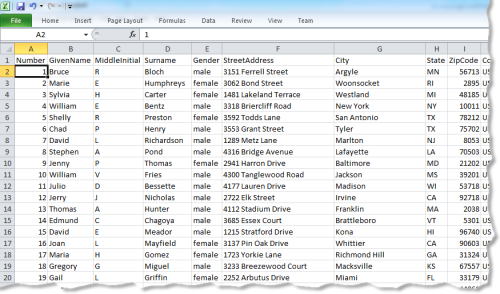
Do you have a huge spreadsheet file (an excel file) and wanting to take the data out and place it on a database, or process those data to get some results?


Yeah, I faced the same issue couple of months back, had a big excel file with information of people and wanted to extract them to a database. Here's how I tackled it.


JExcelApiJava Excel API - A Java API to read, write, and modify Excel spreadsheets


You can go to its page using this link
You can download the required library from here

Using that API you can,
  • Reads data from Excel 95, 97, 2000, XP, and 2003 workbooks
  • Reads and writes formulas (Excel 97 and later only)
  • Generates spreadsheets in Excel 2000 format
  • Supports font, number and date formatting
  • Supports shading, bordering, and coloring of cells
  • Modifies existing worksheets
So here is how I used it. 

public ArrayList<Person> read(String inputFile) throws IOException {
        File inputWorkbook;
        Workbook w;
        Sheet sheet;
        private ArrayList<Person> peopleList;
    
        peopleList = new ArrayList<>();
        inputWorkbook = new File(inputFile);     // absolute path and name 
                                                       //of the spreadsheet file
        try {
            w = Workbook.getWorkbook(inputWorkbook);
            sheet = w.getSheet(0);//put the sheet number or you can automate this

            int numberOfRows = sheet.getRows();
            for (int i = 0; i < numberOfRows; i++) { //i=0 is the heading
                Person aPerson = new Person();
                aPerson.setName(sheet.getCell(1, i).getContents());
                aPerson.setContactNo(sheet.getCell(2, i).getContents());
                aPerson.setContactNo2(sheet.getCell(3, i).getContents());
                aPerson.setAddress(sheet.getCell(4, i).getContents().replaceAll("'", " "));
                aPerson.seteMail(sheet.getCell(5, i).getContents());
                if(!sheet.getCell(6, i).getContents().isEmpty()) {
                    aPerson.setbDay(new SimpleDateFormat("dd/MM/yyyy").parse(sheet.getCell(6, i).getContents()));
                } else {
                    aPerson.setbDay(new Date(0));
                }
                aPerson.setGroup(sheet.getCell(7, i).getContents());
                aPerson.setGender(sheet.getCell(8, i).getContents().charAt(0));
                peopleList.add(aPerson);
                System.out.println(aPerson);
            }

        } catch (Exception e) {
            e.printStackTrace();
        }
        return peopleList;
    }


PS : if you have a new version excel file, you need to save it as an 'xls' file to work. Read the documentation for more info

You can then use the extracted date to store in a database or for your calculations.

One thing to remember, if you have a problem (any), it is most likely that somebody might had faced the same problem before and has found a solution, So the golden rule is Google before you solve.

Happy coding folks..

Sunday, October 5, 2014

Using GIT effectively

This article is about some of the good practices I learnt from the industry when using the GIT..

Git-logo.svg     Lets briefly see what is GIT. It is a distributed version controlling system. You can find a wikipedia article from here. In simple words when you are developing a system, you might need to keep track of the changes/modifications you did to the code and once in a while you might need to revert to a previous working state of a code. GIT is a handy tool for that task.
You might be developing a system as a project where each members contribute to the code, So how can you support this? GIT is the solution, you can have you code in a GIT repository and you all can work on the same code without interfering to others (given that you use GIT effectively).
Hope you got enough motivation ;)

I will explain basics of the GIT in a later article.

In this article I'll introduce you GIT best practices

Hack 1 : Every day before you start your work take a pull from the repository
git pull origin
This will make sure your code is up to date

Hack 2 : Every day before you finish you page push all your changes to the repository
this has few steps let me explain them to you in below
This will make sure the code in the repository contains all the up to date modifications

Hack 3 : Use separate branches to implement separate features/ functionalities
git branch branchName
git checkout branchName
Use a meaningful for every branch, so that your life would be easy, with separate branches you have a lot of flexibility to even to hold current work and start implementing another feature on another branch.

Hack 4 : Never work on the 'master' branch
git checkout branchName
If you work on the master branch you are in a big trouble when pulling the changes. If you code got broken due to the pull, it wouldn't be easy to solve the conflicts and merge the changes.


Hack 5 : Steps to push changes
Here I assume you are in a branch called my branch.
git add --all                                <-- stage all the modified/created files
git commit -m "commit message"
git checkout master              <-- go to the master branch, note none of you new changes are
                                                                    visible in the master branch
git pull origin                        <-- pull and get the up to date code from the repo
      If conflicts are there, resolve them and merge the code. Now you have up to date code in the      
      master branch
git checkout myBranch        <-- go to myBranch
git rebase master                <-- take the changes in the master to myBracnch
      If conflicts are present
git mergetool                           <-- using the mergetool to resolve confilcts
git commit -m "message"   <-- commit the changes in resolving the confilcts
git rebase --continue       <-- command to continue the rebase process
git checkout master               <-- go to master branch
git pull origin                    <-- check whether the code in the repository has been changed while we were working on the rebase process of myBranch, if the code is up to date we can continue the process, if any changes have been pulled, we need to again do the rebase process.
git merge myBranch                 <-- merge the changes of the myBranch to master
git push origin master       <-- push the code to the repository, now the repository has
                                                                  your code

Hack 6 : Add meaning full comments to commits
git commit -m "commit message"
Adding meaning full commit messages will make your life so easy when you want go back to a previous state. It is advised to use the commit message in present tense.

Here is a nice Git Guide
Ok those are the things I wanted to share, happy coding folks :D


Thursday, January 23, 2014

The 1-Minute Trick - A Productivity Hack:

Are you feeling your everything is messed up..? Here is a cool productivity hack, it's simple, easy and efficient.. Just give it a try


When you are doing your day to day life. You encounter a lot of things which can be completed within a minute. For example keeping your shoes in the right place, replying an e-mail or a SMS message, keeping a book at the right place. But we usually neglect those tasks and postpone that task. The result is a messed up and untidy life. This trick is simple

Any task you can do within a minute, Do it at that time, without any delay.

Just give it a try and see how beautiful and easy you life would be :)

for more info http://www.linkedin.com/today/post/article/20140121122045-6526187-productivity-hacks-the-1-minute-trick?trk=mp-details-rc

Monday, January 13, 2014

Do I really need to use 'safely remove' feature for USBs?

Safely remove hardware and Eject Media feature is beneficial in three ways

  1. Removing the USB drive when some files are being writing into the drive will definitely corrupt data. That feature will prevent it
  2. Operating Systems use a write cache to speed up writing into drives, Sometimes OS would not write all the date at the time it receives the write request, but OS might keep it in a cache and write once substantial amount of data is present to write. When we use the safely remove feature OS flushes the cache and writes all the date to the drive.
  3. A stable supply of power is required for  a small time period for a USB device to properly write all the date. It is actually an electrical requirement. That time is not very significant. Therefore this will not affect most of the time

The Good news is

Most operating systems including Windows do not use a write cache for removable drives, which means your removing without using this feature would not do much harm
to your data in the USB drive. But it is better to use that feature unless you are in a big hurry :D
More Info

Tuesday, August 6, 2013

Tank Game AI and UI - Programming Challenge


The Tank battle game is a popular Nintendo game in 90s and early 2000s.The tank game is also known as Tank 90. It is a game where you have a treasure to secure while destroying enemy tanks. The treasure is surrounded by a brick wall; the treasure is symbolized by an eagle sign. The enemy tanks try to destroy our treasure; each state is having fixed number of enemy tanks. All the tanks have different level, those levels state the armor and the speed of the each tanks, higher the level higher the armor. The level is reduced when a tank is hit by a bullet. The level of our tanks can be increased by accruing suddenly appearing power symbols. There are various power symbols. Some are to increase our level, some are to lock all the enemy tanks for a period of time, some are to blast all the remaining enemy tanks.


There are types of blocks, they are bricks, stones, trees and water.

We can also play the game in the battle mood, where two players are given separate two treasures to secure. In order to with the game each player must either destroy opponent’s tank or the treasure.

Our Task

Our task was to deign the game client, which is mainly having two components


  • Artificial Intelligence Component (AI)
  • Graphical User Interface Component (GUI)

Artificial Intelligence Component

The game client should understand the game map and act accordingly. The AI part should first identify the
game map. Then it must be able to decide its path. Since the goal of this game is to collect as much as coins the AI component should mostly concentrate on gathering as much as coin. AI should identify nearby coin piles, and also it must take into account the lifetime of the coin pile. It should select the coin piles which are reachable before it disappears.

Since other tanks can shoot the tank, AI must avoid getting shot and need to restore health by acquiring life packs. AI should shoot other tanks, in order to be safe and steal the coins collected by those tanks.

Graphical User Interface Component

There should be a component to see the game from the client computer by decoding the server messages.